Google OAuth graduates
Gmail OAuth is now the recommended Gmail path in first-run setup and Settings, backed by the Gmail API for sync, body reads, drafts, mailbox actions, and send. Gmail App Password remains the fallback.
Public beta · v0.7.2-beta.1
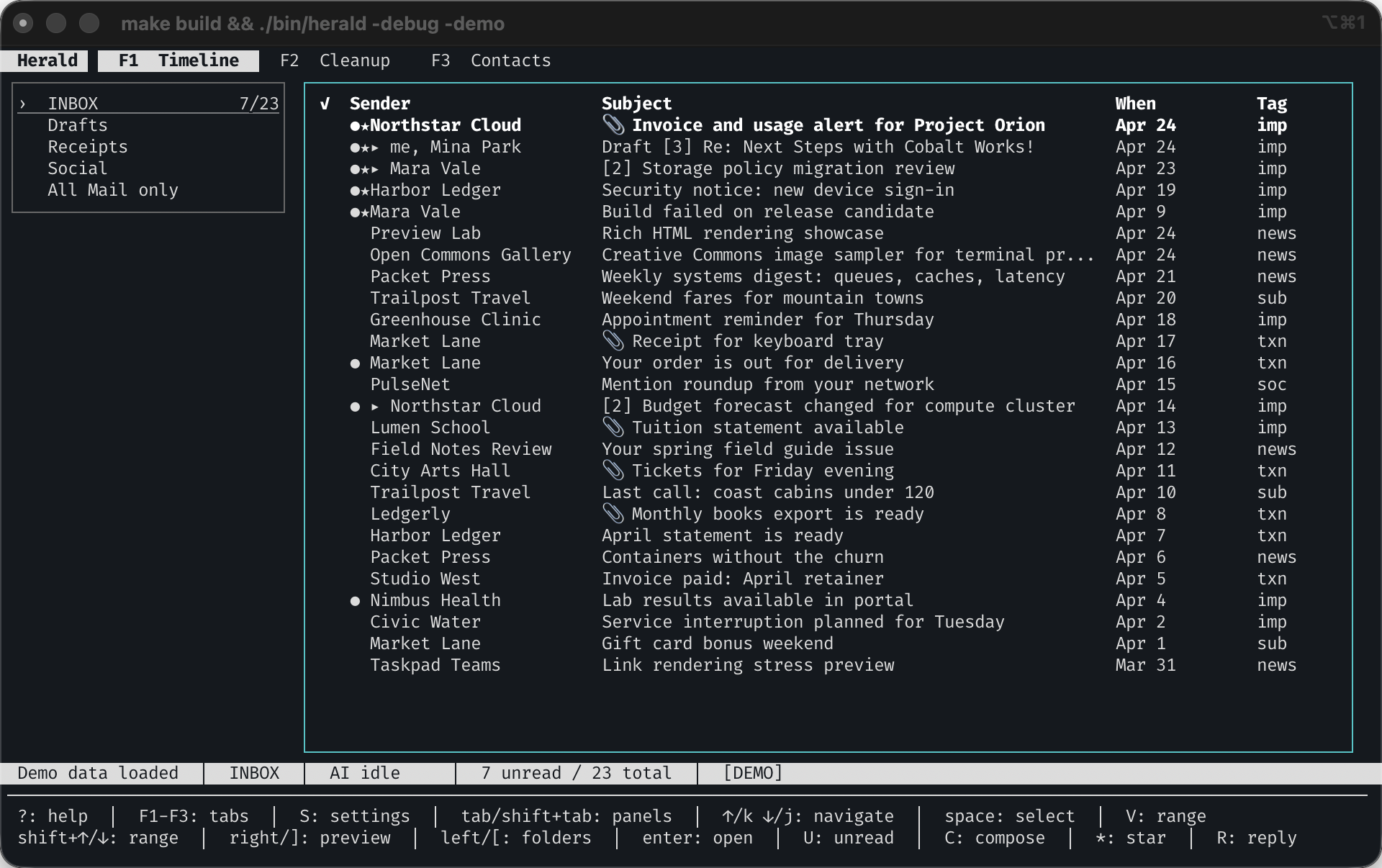
Herald is a keyboard-first and mouse-friendly workspace you can try
safely with a fake inbox and demo calendar before trusting it with
real accounts. Read, search, clean up, compose, plan your week, and
manage mail from the terminal, then add optional semantic search, rules, AI helpers, and trusted local agent surfaces when you want more help.
Built-in themes let Herald feel at home in your terminal.
Press ? anywhere Herald owns keyboard input to open
context-sensitive shortcut help.
brew tap herald-email/herald
brew install herald
herald --demo
Recommended for macOS. Demo mode requires no email account, calendar account, API key, or Ollama install. For source installation on Linux, read the docs.
New in v0.7
The What's New in v0.7 docs page is the best product tour for the current v0.7.2-beta.1 beta. The 0.7 line graduates Google OAuth, hardens multi-account and calendar sources, adds provider-backed calendar writes, and makes preview reading safer and easier to copy from.
Gmail OAuth is now the recommended Gmail path in first-run setup and Settings, backed by the Gmail API for sync, body reads, drafts, mailbox actions, and send. Gmail App Password remains the fallback.
Google Calendar OAuth and CalDAV sources now support cache-backed Week, Day, 3-Day, Agenda, Search, and Event Detail views, plus provider-backed create, edit, delete, RSVP, reminders, recurrence, and attendee changes.
Email previews can import text/calendar parts and .ics attachments into a writable calendar, with duplicate UID update or skip handling.
Account-scoped folder trees, source badges, From routing in Compose, draft handling, and source-scoped MCP/daemon mutation guards make multi-account work explicit.
Preview rendering gained bounded native images, opt-in remote HTML image reveal, sanitized link targets, visible cursor selection, mouse drag selection, visual-range copy, line copy, and richer clipboard payloads.
Compose gained external-editor body editing, preserved reply and forward context, account-scoped signatures, and Gmail API draft/send parity. Native macOS Contacts import, notifications, and herald:// deep links round out the workflow.
Three daily surfaces
Herald now has a clearer source-aware rhythm: scan the inbox, plan around the calendar, then let rules and trusted local agent tools handle repeat work with account and calendar scope in view.
Read chronologically, open split or full-screen previews, search cached mail, reply, forward, save attachments, and review cleanup groups by thread, sender, or domain.
Plan from Week Time-Grid, Day Agenda, 3-Day Command, Agenda, Search, and Event Detail views with colored source filtering and keyboard or mouse navigation.
Use rules, cleanup managers, MCP, daemon reads, and scoped mutation guardrails when you want Herald to help without guessing which account you meant.
Calendar
Press 3 to open Calendar in demo mode. Try Week
Time-Grid, Day Agenda, 3-Day Command, Agenda List, Calendar Search,
Event Detail, source rail filtering, mouse interactions, event
create/edit/delete, RSVP actions, and invitation import from email.
HERALD_THEME=sonokai-signal herald --demoWhy Herald
Open demo mode with synthetic mail and calendar data, learn the workflow, then connect your real account when you are ready.
Move between Timeline, Contacts, and Calendar with number keys. Read, reply, plan, search, and clean up without changing tools.
Sender, subject, body, and calendar search work from the local cache. If you add embeddings later, prefix a query with ? to search by meaning.
Rules, cleanup grouping, MCP, and daemon APIs carry source scope so multi-account reads and mutations can target the right account.
Trust model
Herald runs on your machine and connects through accounts you configure. It keeps a local SQLite cache for fast search and navigation, asks before revealing remote preview images, and keeps AI optional: normal email, calendar, cleanup, compose, and keyword search work without Ollama or cloud model keys.
Try without email
Demo mode uses synthetic messages so you can try the terminal workflow, reading, search, compose, Calendar, cleanup grouping, and rules without sharing credentials or changing your mail.
herald --demoBuilt-in themes
Herald can inherit your terminal colors, launch with a one-off
-theme flag, or save a built-in app theme from Settings.
The built-in catalog includes warm, green, blue, violet, paper, and
terminal-inspired palettes, with local YAML themes when you want to
make your own.
herald --demo -theme jade-signalInstall Herald
The shortest macOS path is Homebrew. If you are on Linux, packaging your own build, or changing the source, follow the docs so provider setup and platform dependencies stay clear.
AI
Herald does not need AI to be useful. The core client works without
Ollama or API keys. When you enable AI, the most useful parts are
semantic search, classification-assisted rules, and the Compose AI
styler: translate a draft, fix typos, make it compact, expand it with
more context, or try different moods before you accept anything.
Open search with /, then type ? query
inside search when embeddings are available.
Provider support
Herald's v0.7 release makes Google OAuth the recommended Gmail setup path and promotes Google Calendar OAuth to a first-class beta source. App-password mail and CalDAV-style calendar setup remain available where a provider supports them.
| Provider | Beta status |
|---|---|
| Personal Gmail | Recommended via Gmail OAuth; App Password fallback remains |
| Fastmail | IMAP/app password |
| iCloud | App-specific password |
| Proton Mail | Via Proton Mail Bridge |
| Custom IMAP/SMTP | Supported |
| Outlook | IMAP support varies by account policy |
| Source | Beta status |
|---|---|
| Google Calendar OAuth | First-class beta source with provider-backed writes |
| Fastmail Calendar | CalDAV with app password |
| iCloud Calendar | CalDAV with app-specific password |
| Yahoo Calendar | CalDAV with app-generated password |
| Custom CalDAV | Provider-specific URL and credentials |
For v0.7, use Gmail OAuth when your install includes Herald's OAuth defaults. Gmail App Password setup remains available when you need the IMAP/SMTP fallback. Google Calendar OAuth and writable CalDAV calendars can create, edit, delete, RSVP, and import events when provider permissions allow it. See the provider setup docs for current mail and calendar paths.
MCP
Herald includes an MCP server for trusted local clients through
herald mcp. Use it to search, summarize, classify,
draft, and read calendar context from your local Herald cache. The
normal command reads your Herald config, while the demo command
serves synthetic data so you can try MCP without connecting a
mailbox or calendar account. Scoped refs and mutation guardrails
keep multi-account automation from guessing which source you meant.
Try MCP demo
claude mcp add herald-demo -- herald mcp --demoUse with real data
claude mcp add herald -- herald mcpBeta limitations